

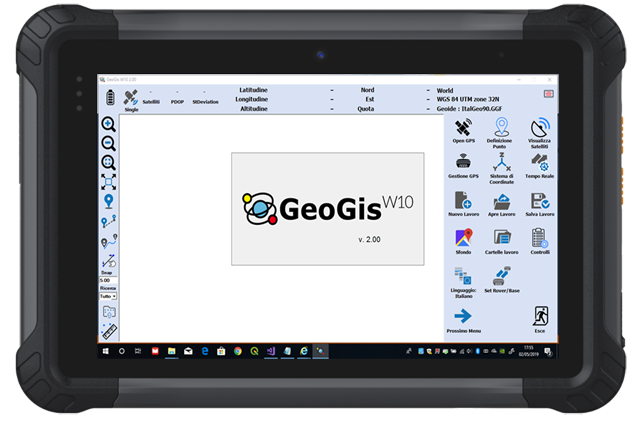
GIS Software for Windows 10 devices GeoGisW10 is a software for topographic survey dedicated to GIS (Geographic Information Systems) applications. The ideal operating environment is a Windows 10 Tablet with GPS, camera, modem for a data SIM and a Bluetooth system to allow connection to all Stonex GNSS receivers. It allows topographic precision surveying using connection to networks that offer RTK service, or rapid survey with metric/decimal accuracy.
GeoGisW10
GIS Software for Windows 10 devices
GeoGisW10 is a software for topographic survey dedicated to GIS (Geographic Information Systems) applications.
The ideal operating environment is a Windows 10 Tablet with GPS, camera, modem for a data SIM and a Bluetooth system to allow connection to all Stonex GNSS receivers.
It allows topographic precision surveying using connection to networks that offer RTK service, or rapid survey with metric/decimal accuracy. Creating a survey file now it is simple, that allows data post-processing for better accuracy.
For every survey, descriptive information may be associated with the elements detected according to a database structure created by the user and/or one or more photographs.
The application allows a fly-over on georeferenced raster images or downloaded by Google in real time.
Topographic operations are summarized as:
Topographic precision survey with RTK connection via SIM card or with the external GPS if this available
Quick survey of metric/decimetric precision
Survey of points, lines, areas and paths
Stakeout of points detected or imported from files containing the coordinates
Setting the most used reference systems and geoids in the world or localization in the field
Tracking of graphically defined lines (bathymetry or similar operations)
Export / Import of data in the most used formats in topographic surveys/GIS (eg Shape file).
GIS users are usually involved in data collection and applications but they are less familiar with methodologies and acronyms typical of GPS systems.
This is why GeoGisW10 offers to the user very clear and simple menus and an arrangement of survey functions with intuitive terminologies.
GIS Software for Windows 10 devices
GeoGisW10 is a software for topographic survey dedicated to GIS (Geographic Information Systems) applications.
The ideal operating environment is a Windows 10 Tablet with GPS, camera, modem for a data SIM and a Bluetooth system to allow connection to all Stonex GNSS receivers.
It allows topographic precision surveying using connection to networks that offer RTK service, or rapid survey with metric/decimal accuracy. Creating a survey file now it is simple, that allows data post-processing for better accuracy.
For every survey, descriptive information may be associated with the elements detected according to a database structure created by the user and/or one or more photographs.
The application allows a fly-over on georeferenced raster images or downloaded by Google in real time.
Topographic operations are summarized as:
Topographic precision survey with RTK connection via SIM card or with the external GPS if this available
Quick survey of metric/decimetric precision
Survey of points, lines, areas and paths
Stakeout of points detected or imported from files containing the coordinates
Setting the most used reference systems and geoids in the world or localization in the field
Tracking of graphically defined lines (bathymetry or similar operations)
Export / Import of data in the most used formats in topographic surveys/GIS (eg Shape file).
GIS users are usually involved in data collection and applications but they are less familiar with methodologies and acronyms typical of GPS systems.
This is why GeoGisW10 offers to the user very clear and simple menus and an arrangement of survey functions with intuitive terminologies.
